Simple SaaS tool for marketers, creators, coaches, and service providers

Create Your Own Professional Member Portals Without Coding, Plugins, Or Complicated Tech

Member Portal Builder lets you create clean, organized member areas for your products, courses, videos, downloads, lessons, resources, and even client projects — all from one easy dashboard.

  • Create portals for your customers, students, subscribers, or clients.
  • Add videos, downloads, protected files, links, and Text/HTML lessons.
  • Organize content by categories and display it in Classic or Course Layout.
  • No WordPress setup. No plugin conflicts. No coding required.
  • Optional affiliate-powered footer links can turn your portals into simple promotion spots.

One-time pricing during this launch. No monthly fee for the plans shown below.

Getting Started
Training Videos
Downloads
Bonus Resources
Course Layout Viewer

Videos, lessons, links, and downloads open neatly inside the portal.

Build a member area in minutes

Create a portal, add categories, add resources, invite members, and deliver your content from one simple login area.

Your Customers Should Not Have To Dig Through Emails To Find What They Bought

If you sell digital products, training, bonuses, downloads, templates, services, or client resources, you need a simple place to put everything. Member Portal Builder gives you that place.

1

Create A Portal

Name your portal, add your branding, welcome message, support email, and decide whether it should allow public signup.

2

Add Your Content

Add links, embedded videos, protected file downloads, resource buttons, and rich Text/HTML lessons.

3

Give Members Access

Add members manually, import by CSV, send setup links, or allow public signup when you want members to register themselves.

What You Can Build With Member Portal Builder

Use it for simple member areas, organized training portals, resource centers, client dashboards, private bonus pages, and more.

Perfect For Product Creators

  • Deliver ebooks, PDFs, bonuses, checklists, templates, and downloads.
  • Create organized training areas for small courses or mini products.
  • Add videos from YouTube, Vimeo, Loom, Wistia, Bunny, or direct video files.
  • Keep customers coming back to one simple branded portal.

Perfect For Service Providers & Agencies

  • Create client resource portals.
  • Deliver onboarding materials, reports, links, training, and files.
  • Use the Agency plan to create portals for clients with commercial rights.
  • Keep client assets organized instead of scattered across emails.

Everything You Need To Build Clean, Useful Member Areas

Member Portal Builder is designed to be simple enough for beginners but flexible enough to handle real products and client projects.

Portal Branding

Add your own logo URL, accent color, welcome heading, welcome message, support email, and active/inactive status.

Members & Access

Create members manually, import by CSV, export members, manage status, update passwords, and send 7-day setup links.

Categories & Sorting

Organize your content into folders/categories and control the order resources appear in the portal.

Resource Types

Add web links, embedded videos, protected downloads, external file links, action buttons, and Text/HTML lessons.

Course Layout

Use the left-side category accordion with a right-side resource viewer so members can move through your content without leaving the portal.

Classic Layout

Prefer a simple resource dashboard? Classic Layout keeps everything clean, direct, and easy to access.

Protected Uploads

Upload protected files so members must be logged in and authorized before they can download them.

Rich Lesson Editor

Create Text/HTML lessons with formatting, headings, colors, links, images, lists, blockquotes, and HTML/source mode.

Basic Resource Click Counts

See simple click counts for your portal resources so you can tell which items are being used.

Affiliate-Powered Footer Links

Add your Member Portal Builder affiliate link once and your public portals can display a simple powered-by link that points through your affiliate URL.

No More Messy Delivery

Instead of sending buyers a pile of links, attachments, and instructions, give them one clean login area.

Without Member Portal Builder

  • ✕ Customers lose download links.
  • ✕ Bonuses get buried in emails.
  • ✕ Videos and files are scattered everywhere.
  • ✕ Client resources become hard to manage.
  • ✕ You waste time resending links and answering support requests.

With Member Portal Builder

  • Customers log in and find everything in one place.
  • Videos, downloads, lessons, and resources stay organized.
  • You can create multiple portals for different products or projects.
  • Members get a smoother, more professional experience.
  • You look more organized and more professional.

Built-In Affiliate Promotion For Member Portal Builder Users

Member Portal Builder does more than help you deliver content. It can also give you a simple way to promote the software from the public portals you create.

1

Request Your Affiliate Link

Inside the app, eligible users can visit the Affiliate page and request their Member Portal Builder affiliate link through Warrior Plus.

2

Paste It Once

After approval, paste your affiliate link into Member Portal Builder one time. The app can then use that link on the public portals you create.

3

Promote From Your Portals

Your portal footer can include a simple “Member Portal Builder Powered by Profit Tool Hub” message, with Member Portal Builder linked through your affiliate URL.

This gives marketers, product creators, and agencies a simple way to let their own portals quietly point people back to Member Portal Builder. It is not a promise of commissions or earnings, but it does turn the powered-by footer into a useful promotional link instead of plain text.

See Member Portal Builder In Action

Here are a few examples of the kinds of clean, organized member experiences you can build with Member Portal Builder.

Text / HTML Lessons

Teach With Rich, Easy-To-Read Text Lessons

Create detailed lessons, tutorials, walkthroughs, and written training that members can read right inside the portal. This makes it easy to deliver step-by-step content without sending people to outside documents.
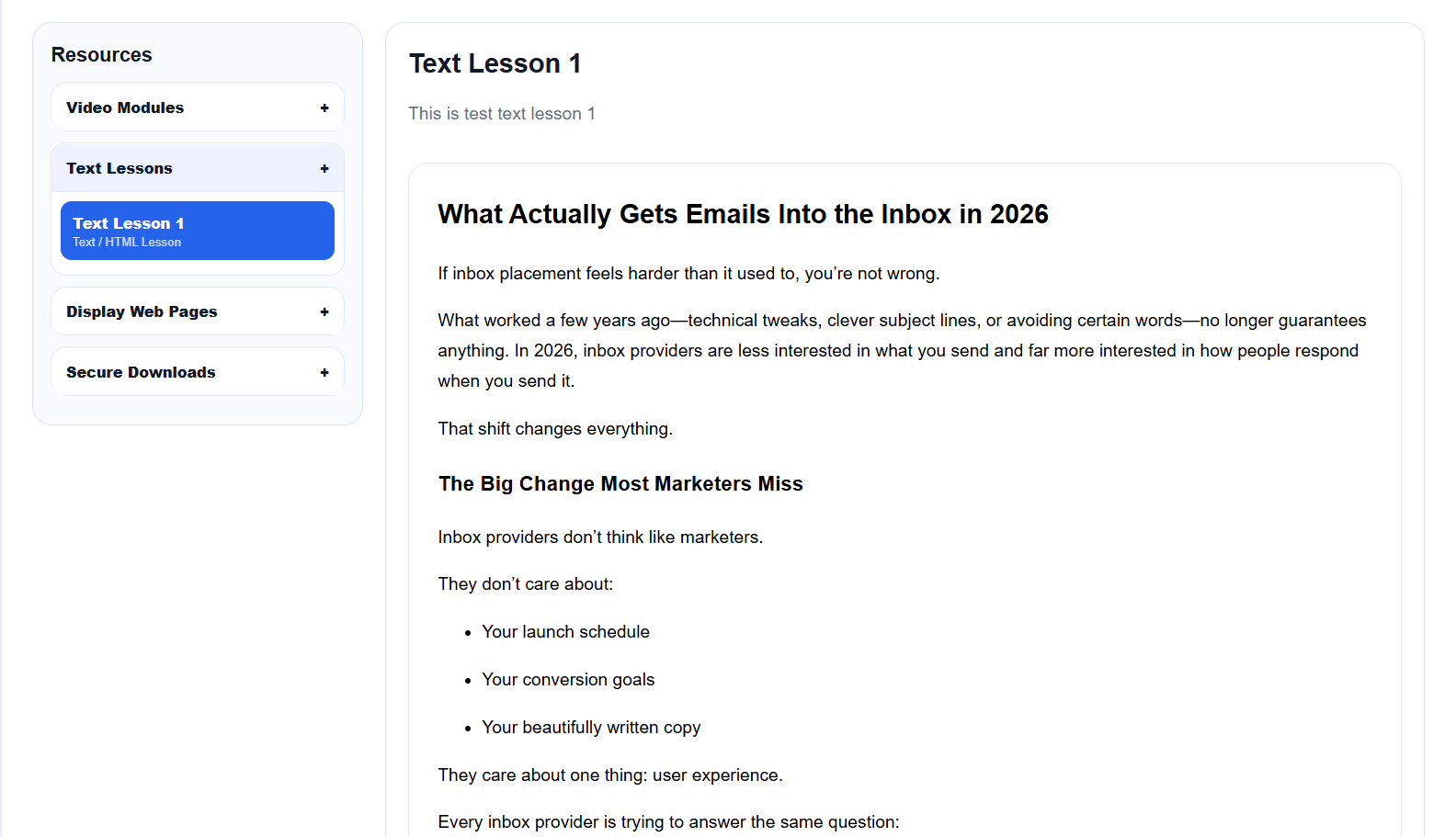
Text lesson displayed inside Member Portal Builder
Video Modules

Deliver Video Training In A Clean Course Layout

Organize your video modules on the left and let members watch the selected training in the main viewing area. It feels more like a real training portal and keeps your content easy to follow.
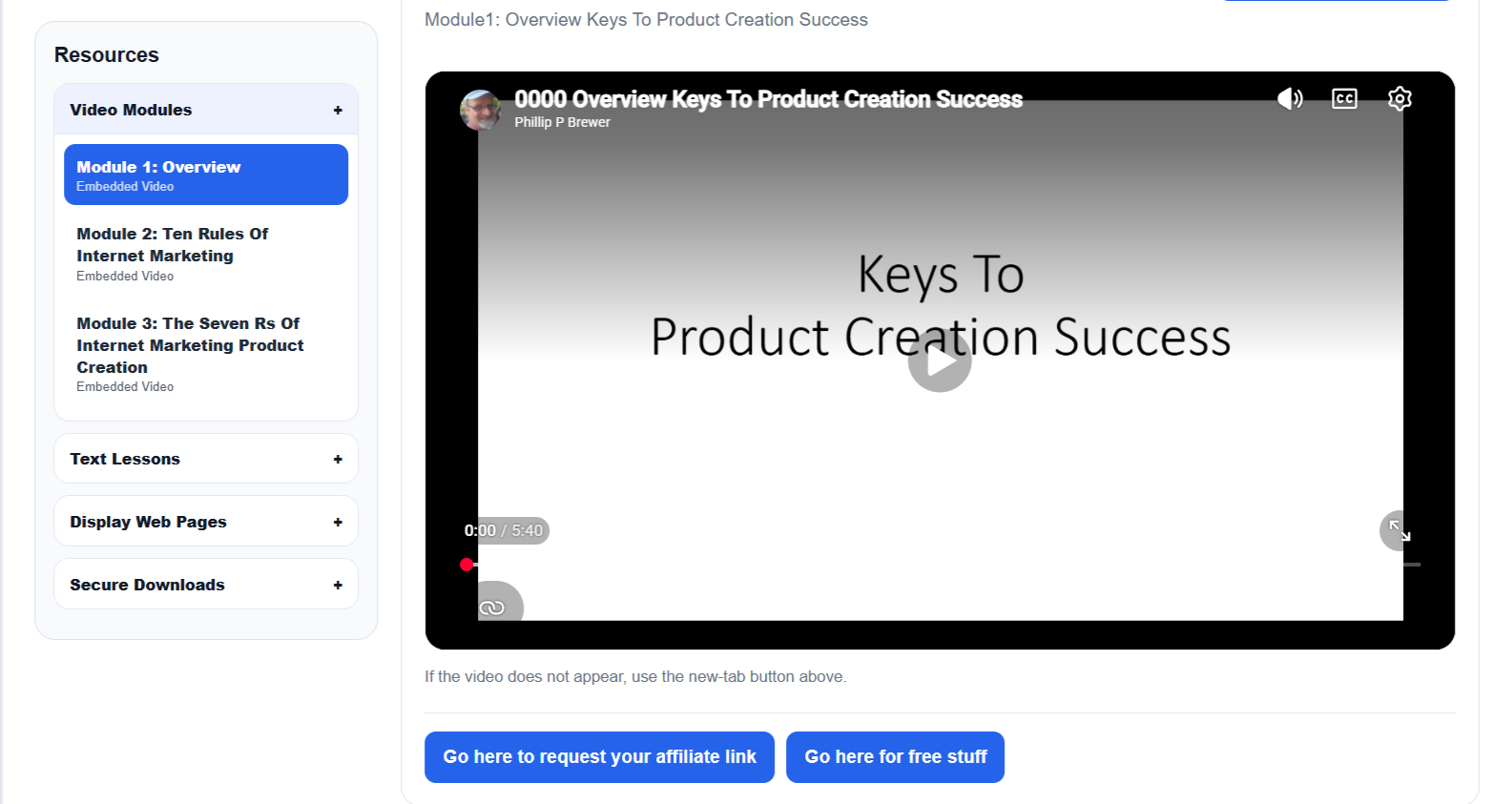
Video modules displayed inside Member Portal Builder
Display Web Pages

Show Web Pages And Resources Right Inside The Portal

Display sales pages, support pages, affiliate tools, external resources, or custom web content right inside the member area, so users can access everything from one place.
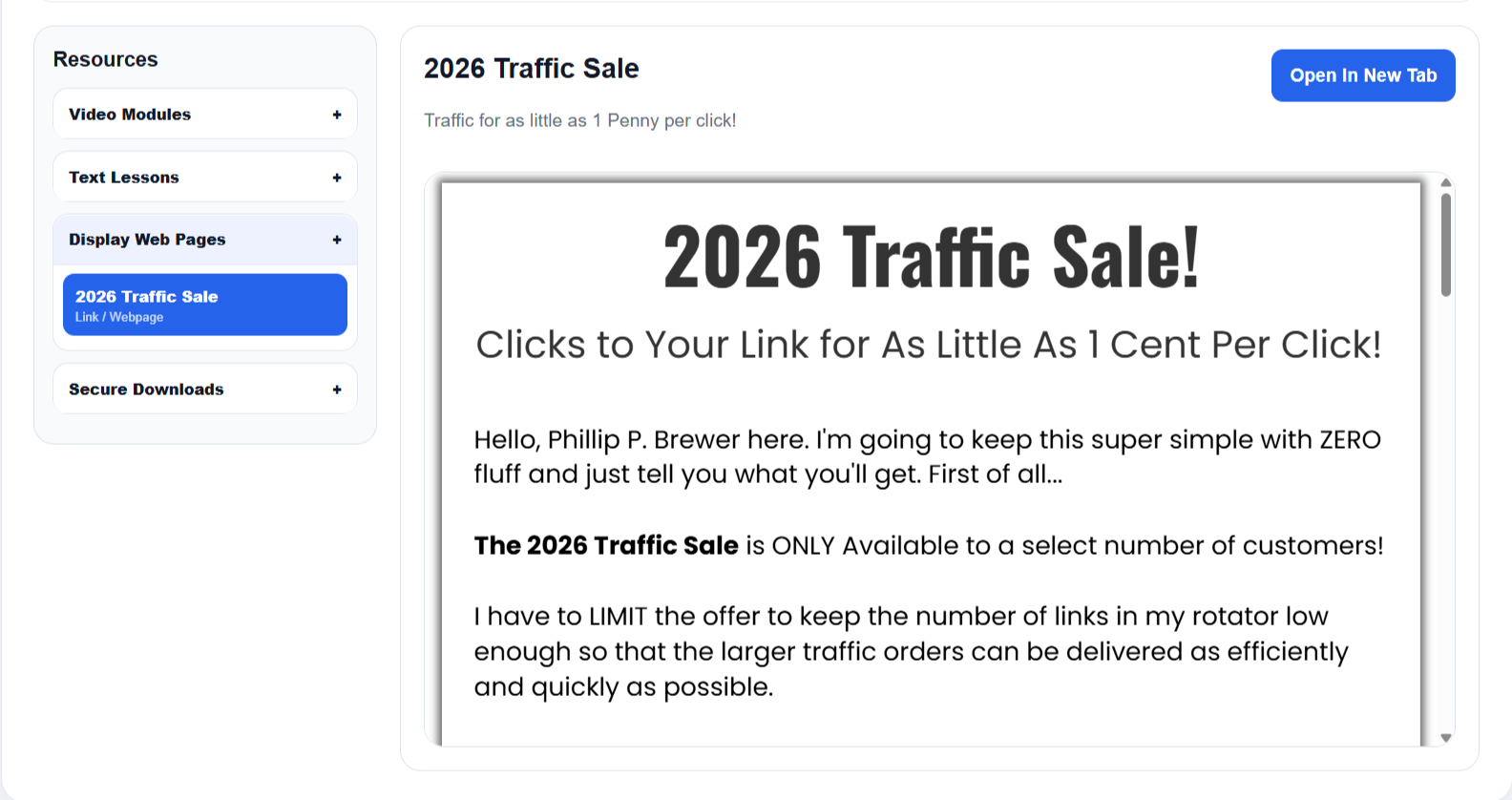
Webpage resource displayed inside Member Portal Builder
Protected Downloads

Keep Valuable Downloads Protected

Secure your downloadable files behind member access so only approved users can get them. This is great for ebooks, templates, bonuses, ZIP files, and client deliverables.
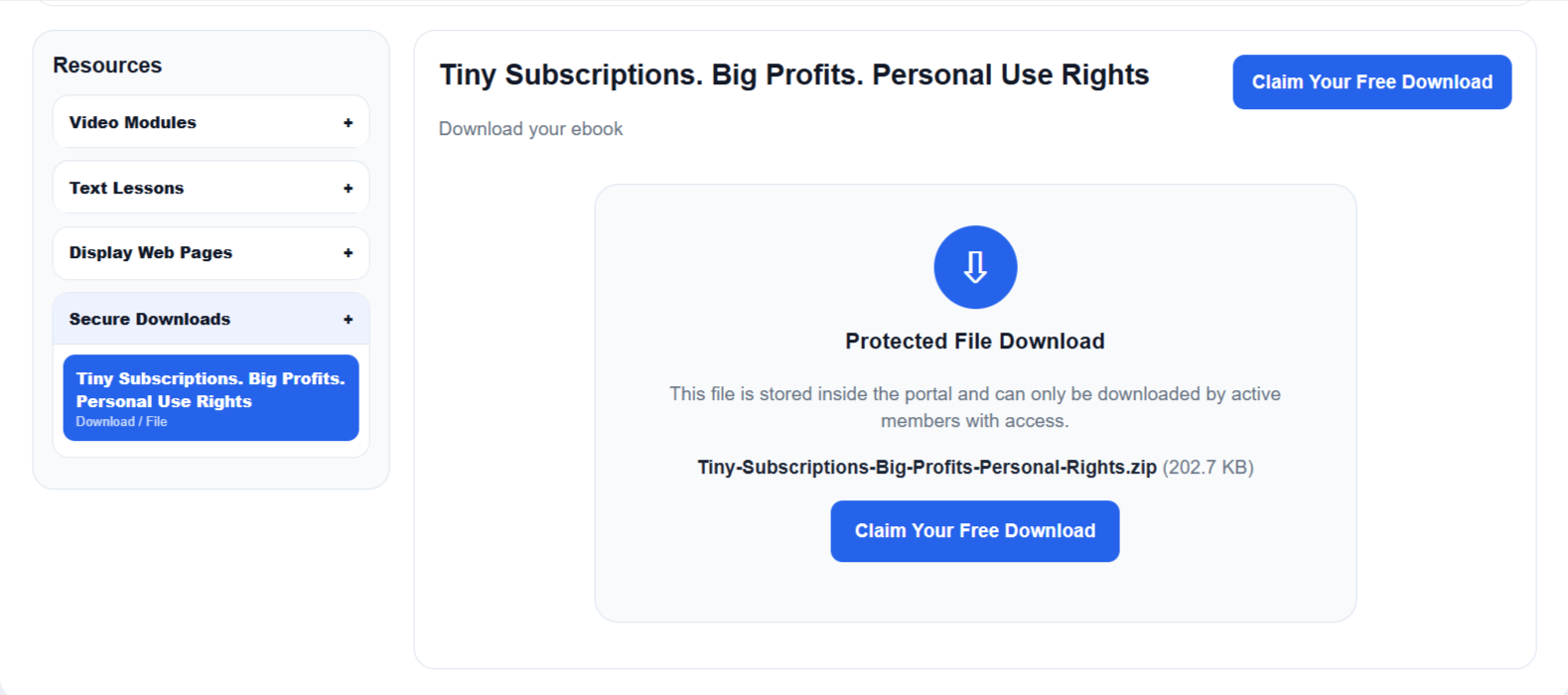
Protected download shown inside Member Portal Builder

Choose Your Member Portal Builder Plan

Launch pricing is a one-time fee. Pick the plan that fits how many portals you want to create.

Best For Product Owners

Pro Plan

$17 one-time

For marketers and creators who want to deliver their own products, bonuses, training, and resources.

  • Create up to 10 member portals
  • Up to 1,000 members
  • Up to 250 resources
  • Portal branding options
  • Classic Layout and Course Layout
  • Videos, links, downloads, and Text/HTML lessons
  • Member import/export
  • Protected file downloads
  • Affiliate-powered public portal footer link
Get Pro Access
Includes Commercial License

Agency Plan

$37 one-time

For users who want higher limits and the right to create portals for clients.

  • Create up to 1,000 member portals
  • Unlimited members
  • Unlimited resources
  • Commercial license included
  • Create portals for clients
  • Great for agencies, freelancers, consultants, and service providers
  • All Pro features included
  • Higher limits for long-term growth
  • Affiliate-powered public portal footer link
Get Agency Access
Launch pricing and one-time access may change in the future. Get the plan that matches your needs while this offer is available.

Who Should Grab This?

Member Portal Builder is especially useful if you sell or deliver any kind of digital content, resources, services, or client materials.

Affiliate Marketers

Create bonus delivery portals for affiliate promotions and give buyers a clean place to access your bonus materials.

Product Creators

Deliver ebooks, videos, downloads, templates, mini-courses, and training without setting up a complicated membership platform.

Agencies & Freelancers

Create client portals for onboarding, reports, assets, training, links, and deliverables with the Agency commercial license.

Give Your Buyers A Better Delivery Experience

A clean member portal makes your product feel more valuable, more organized, and more professional.

Frequently Asked Questions

Here are a few quick answers before you get started.

Do I need to install WordPress?

No. Member Portal Builder is a hosted SaaS tool inside Profit Tool Hub. You log in, create your portal, add content, and invite members.

Can I add videos?

Yes. You can add embedded videos from sources like YouTube, Vimeo, Loom, Wistia, Bunny, and direct video URLs such as MP4, WebM, and Ogg.

Can I upload protected files?

Yes. Protected uploads are available so members must be logged in and authorized before downloading files.

What is the difference between Pro and Agency?

Pro is for creating your own portals and includes 10 portals, 1,000 members, and 250 resources. Agency gives you higher limits with 1,000 portals, unlimited members/resources, and includes a commercial license for creating portals for clients.

Can I use this for client work?

Yes, but choose the Agency Plan if you want the commercial license to create portals for clients.

Is this a monthly fee?

The launch plans shown on this page are listed as one-time pricing. Future pricing may change.

How do the powered-by affiliate links work?

Member Portal Builder users can request their affiliate link, paste it into the app, and have the Member Portal Builder part of the public portal footer link through their affiliate URL. It is a simple promotional feature, not a guarantee of commissions or earnings.

Ready To Build Your First Member Portal?

Choose Pro for your own products, or Agency if you want higher limits and commercial client-use rights.

Get Pro

10 portals, 1,000 members, 250 resources.

Get Pro Access

Get Agency

1,000 portals, unlimited members/resources, commercial license.

Get Agency Access

If you have questions or issues please contact me for support.


Earnings Disclaimer: There is no promise or representation that you will make a certain amount of money, or any money, or not lose money, as a result of using our products and services. Any earnings, revenue, or income statements are strictly estimates. There is no guarantee that you will make these levels for yourself. As with any business, your results will vary and will be based on your personal abilities, experience, knowledge, capabilities, level of desire, and an infinite number of variables beyond our control, including variables we or you have not anticipated. There are no guarantees concerning the level of success you may experience. Each person's results will vary. There are unknown risks in any business, particularly with the Internet where advances and changes can happen quickly. The use of our information, products and services should be based on your own due diligence and you agree that we are not liable for your success or failure